How Can We Help You?
Alternatively, you can also browse on the topics below to find what you are looking for.
JaGaApp 2.0 Emergency Assist
Overview
- Home Emergency
- Location Emergency
Home Emergency

Tap on "Emergency" to get started.

Click on "Alert Guard & Family" to trigger Emergency Alert.
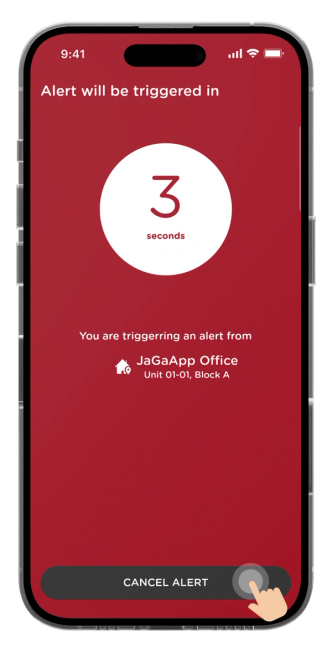
All alerts will be triggered automatically in 3 seconds.
You may click "Cancel Alert" for accidental press.

All emergency contacts including the Guard House will be alerted automatically.

If the situation has been solved, tap on "Confirm Safety" and the guards will know that you are ok.
Location Emergency
Tap on "Emergency" to get started.

Click on "Send Location To Family" to trigger Emergency Alert.

All alerts will be triggered automatically in 3 seconds.
You may click "Cancel Alert" for accidental press.

Your current location will be sent to all your emergency contacts.
Click "I'm Okay, Stop Tracking" to acknowledge and stop the location emergency alert.

A safety message will appear. Click "Call User" to contact directly or "Show Location" to access last location via Waze.