How Can We Help You?
Alternatively, you can also browse on the topics below to find what you are looking for.
JaGaApp 2.0 Facility Booking
Overview
- How to Book Facility?
- How to Check Your Facility Booking Status?
How to Book Facility?

Tap on "Facility" to get started.

To make a booking for a facility, click on the "Add New Booking" button.

Choose a facility that you'd like to book.
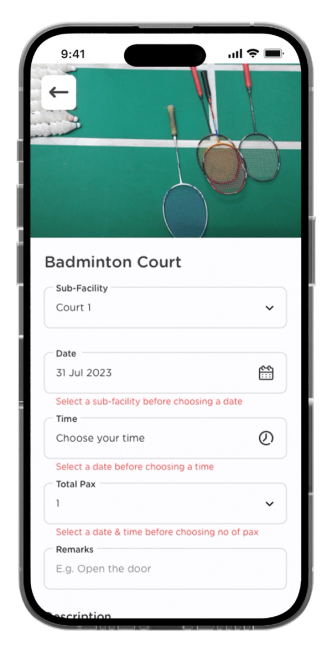
Select your booking date, time, total pax and remarks if available.

Click on "Book Now" upon completion.

Your facility booking has been submitted successfully. View booking details by clicking "View Booking Details".
How to Check Your Facility Booking Status?

Click on the "Upcoming" tab to see a summary of your upcoming facility bookings.

If your facility booking required payment, upload your payment proof in the details page.
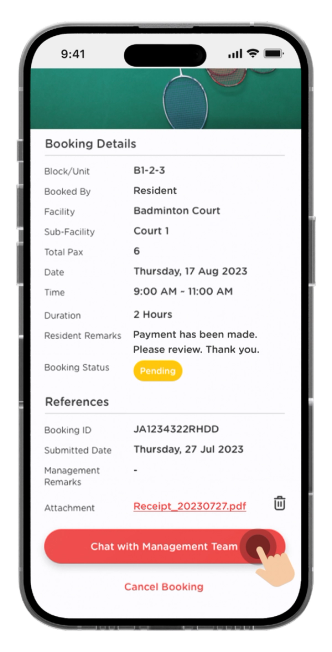
Click on "Chat With Management Team" if you face any issues with the booking.

Further discuss your facility booking issue in the chat room with your Management Team.
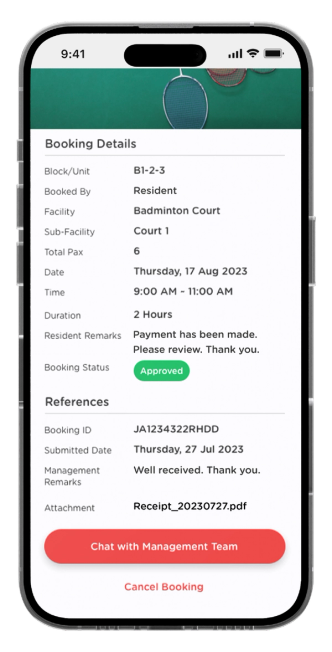
Once management has reviewed your booking details, the status will turn into "Approved".